Key Features
- File taxes. Allows someone else to prepare and file returns, such as income and corporate taxes with the IRS.
- Represent the taxpayer. Authorizes someone else to communicate with the IRS for tax-related matters.
- Receive notices. To request and obtain copies of IRS letters, notices, and transcripts.
- Negotiate tax issues. To handle audits, payment plans, penalties, and settle disputes with the IRS.
- Sign tax forms. Gives authority for the representative to sign tax forms on behalf of the taxpayer.
Who can represent me?
- Attorneys
- Certified Public Accountants (CPAs)
- Enrolled Agents (federally licensed tax individuals[2])
- Officers (of an organization)
- Full-Time Employees (of the taxpayer)
- Family Members
- Enrolled Actuary (under the Joint Board for the Enrollment of Actuaries)
- Unenrolled Return Preparer
- Qualifying Student or Law Graduate
- Enrolled Retirement Plan Agent
How to Write
Download: PDF
Part I – Taxpayer’s Information[3]
Section 1. Taxpayer’s Details
- Full Name
- Address
- Tax ID No. (Social Security Number or Employer Identification Number)
Section 2. Representative’s Details
- Full Name
- Address
- No. (Preparer Tax Identification Number (PTIN) or Centralized Authorization File (CAF) Number)
Section 3. Acts Authorized
- Describe the tax matters that are being handled (e.g., income), the tax form number(s), and the years represented.
Section 4. Specific Use Not Recorded
- Check this box if the designation is for a one-time or specific use case that will not be stored on the IRS CAF system.
Section 5. Additional Acts Authorized
- If the taxpayer is having their taxes filed on their behalf, check the box labeled “Sign a return.” Otherwise, enter the acts being authorized on the taxpayer’s behalf.
Section 6. Retention / Revocation of Prior Power of Attorney
- Check this box if any prior Form 2848 designation will remain in effect (by default, a newly filed version will void all previous ones.
Section 7. Taxpayer’s Signature
- The taxpayer must sign, date, and print their name.
- A wet signature is required if the representative will file this form through non-online methods (fax or mail).[4]
Part II – Declaration of Representative
- Designation
- Insert a letter, “a” through “r.”
- Licensing Jurisdiction
- Where the representative is licensed, enter the State or licensing authority.
- License Number
- BAR, license, certification, registration, or enrollment number.
- Representative’s Signature
- The representative must sign and date.
Filing with the IRS
IRS Form 2848 must be filed with the IRS to represent a taxpayer for any act between them and the IRS.
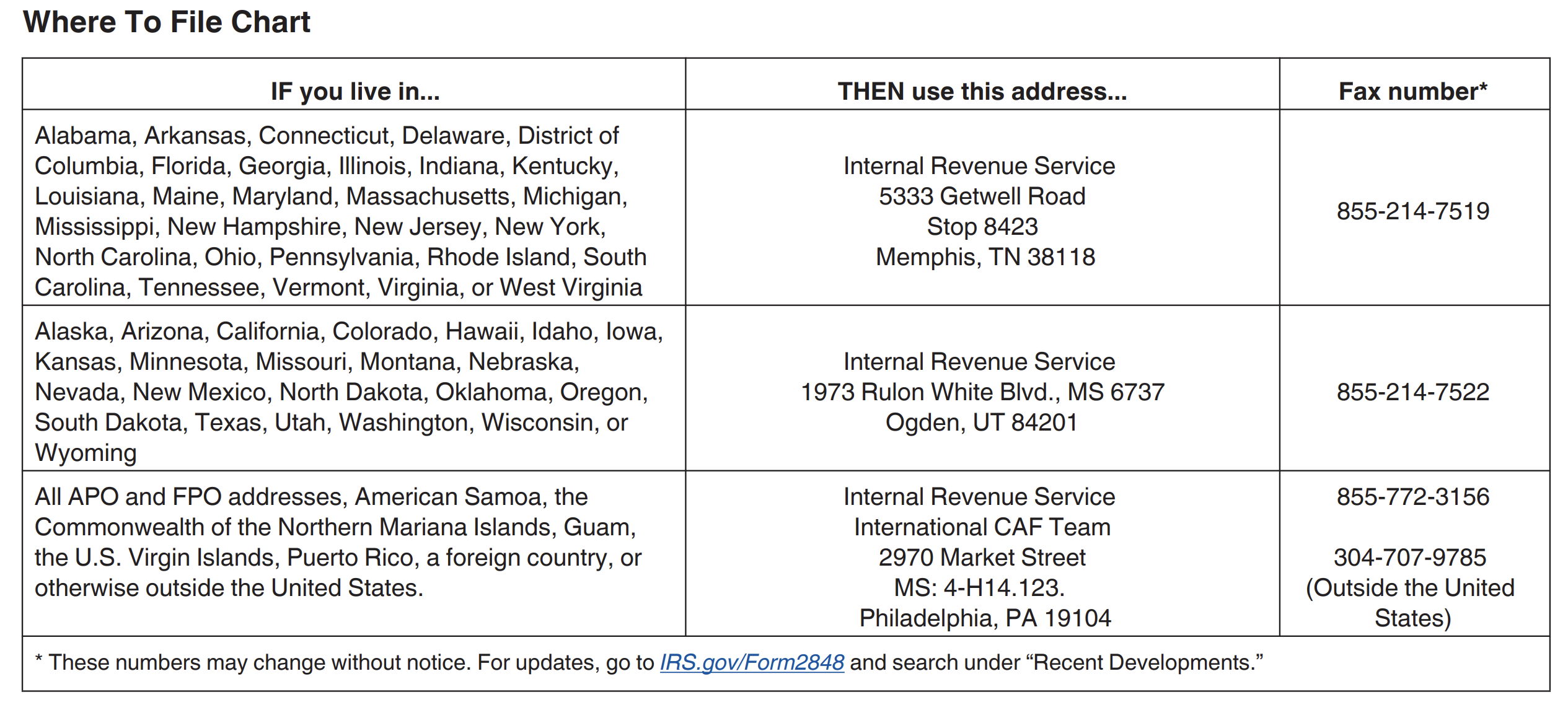
A representative has 3 ways to file.
1. File Online
- IRS Web Portal (login to submit)
2. Fax
- Fax number depends on jurisdiction; see image below.
3. Mail
- Mailing address depends on jurisdiction; see image below.